ip
Miku User Guide
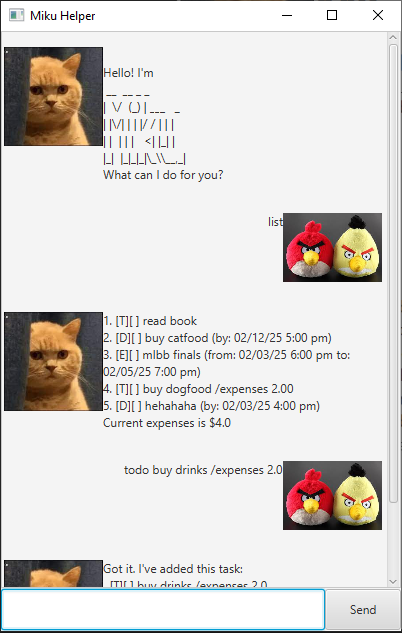
Use Miku to keep track of a list of tasks and events you have, as well as track any expenses!
Adding deadlines
Add any important deadlines you have, indicate the date and any expenses.
deadline <description> (/expenses <expenses>) /by <date>
Example:
deadline feed cat /expenses 5.25 /by Jan 7th 2025 5pm
Got it. I've added this task:
[D][ ] feed cat /expenses 5.25 (by: 01/07/25 5:00pm)
Now you have 7 tasks in this list.
Adding todos
Add any important takss you have, indicating any expenses.
todo <description> (/expenses <expenses>)
Example:
todo feed cat /expenses 5.25
Got it. I've added this task:
[T][ ] feed cat /expenses 5.25
Now you have 7 tasks in this list.
Adding events
Add any important events you have, indicate from when to when and any expenses.
event <description> (/expenses <expenses>) /from <date> /to <date>
Example:
event feed cat /expenses 5.25 /from Jan 7th 2025 5pm /to Jan 7th 2025 6pm
Got it. I've added this task:
[E][ ] feed cat /expenses 5.25 (from: 01/07/25 5:00pm to: 01/07/25 6:00pm)
Now you have 7 tasks in this list.
Listing tasks
List all tasks.
Example:
list
1. [T][ ] feed burd /expenses 5.00
2. [D][X] feed dog /expenses 5.00 (by: 01/07/25 5:00pm)
3. [E][ ] feed cat /expenses 5.00 (from: 01/07/25 5:00pm to: 01/07/25 6:00pm)
Current expenses is $15.00
Deleting tasks
Delete a task.
Example:
delete 1
Noted. I've removed this task:
  [T][ ] pat burd
Now you have 4 tasks in the list.
Mark tasks
Mark a task.
Example:
mark 1
Nice! I've marked this task as done:
  [T][X] pat burd
Unmark tasks
Unmark a task.
Example:
umark 1
OK, I've marked this task as not done yet:
  [T][ ] pat burd
Find tasks
Find some tasks with search keywords. This command will match any words in the descriptions of tasks.
Example:
find burd
1. [T][ ] feed burd /expenses 5.00